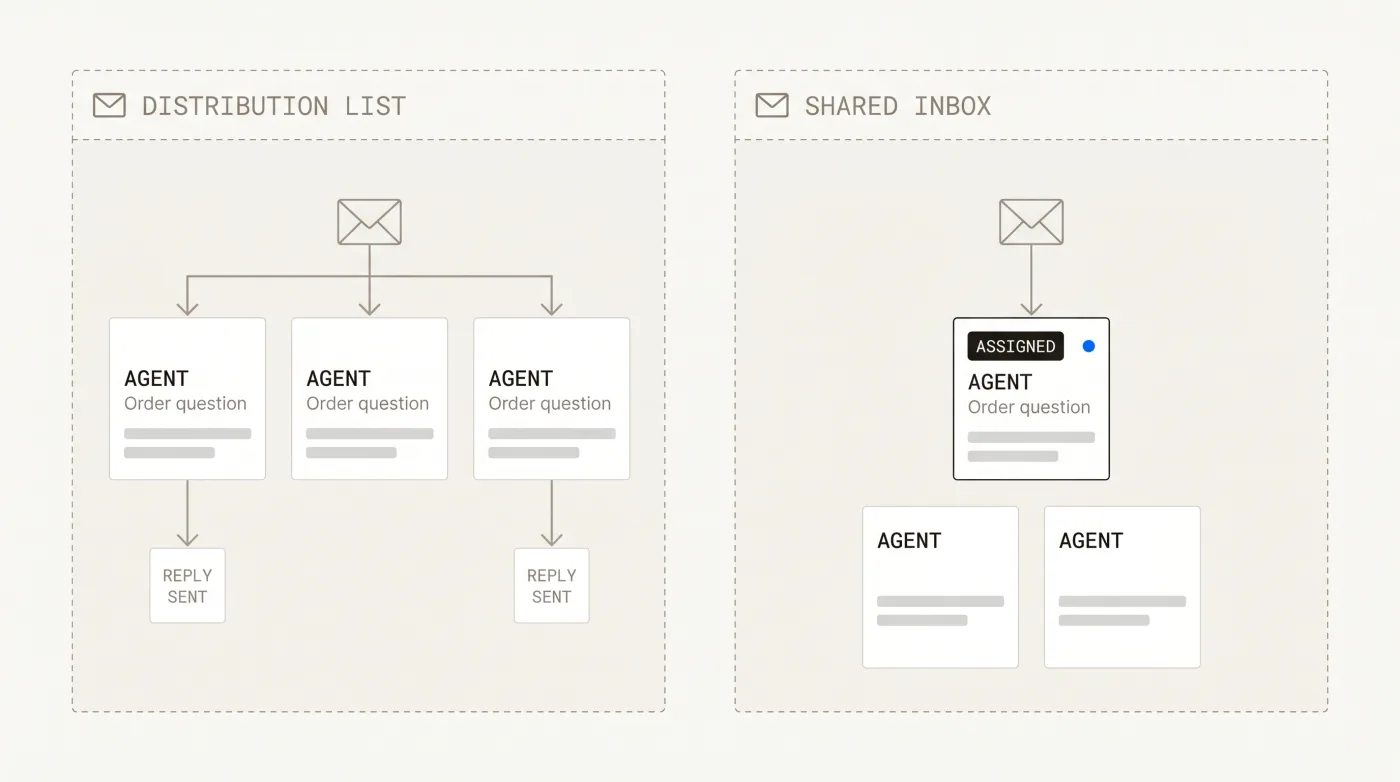
What a distribution list is
A distribution list is an email alias — support@ or help@ — that fans every incoming message out to a group. It's free and simple, but it has no concept of ownership or status. Two people reply to the same email, others assume someone else has it, and threads quietly fall through the cracks. There's no shared record of what's been answered.
What a shared inbox is
A shared inbox is a collaborative layer over that same address. Every message becomes an assignable conversation with a status (open, pending, closed), internal notes only the team sees, saved replies, and collision detection so two agents don't answer at once. Everyone sees what's handled, what's waiting, and who owns it.
When to switch
A distribution list is fine for a couple of people answering a trickle of email. The moment volume grows or more than two people are involved, the lack of ownership and visibility starts dropping tickets and duplicating replies. That's the point to move to a shared inbox — you keep the same address, but gain the coordination a list can't provide.
Help Scout alternatives for teams outgrowing a shared mailbox →
Which should you use?
A distribution list works until it doesn't — usually the moment a second person joins or volume picks up. A shared inbox keeps your existing support@ address but adds the ownership, status, and visibility that stop tickets from slipping. If email is dropping or doubling up, you've outgrown the list.